Houdini FX
- POPs
- Python
- Fun Shelf Scripts
- PythonModule Scripts
- Move Files
- split by group
- Update frame range from file
- OnCreated scripts
- Bake Camera from Alembic
- Get frame range from alembic
- Example On Node Buttons
- Send to Tops
- Set Frame Range without Script
- ROP
- Pull version from hipname
- Get Frame Size of Image File
- Create Agent from built in mocap rig - Simple
- Send selected nodes to new object (fancy way to create object merges)
- Send nodes to new alembic export
- TOPs - symlink output file of parent
- Copy Text to Clipboard example
- Button Python Scripts
- Tops Random
- TOPS mplay python
- Random seed based on hipname
- VEX
- Camera Stuff
- Points
- If then statements
- Transforms and Junk
- Orientation
- Spiral
- Links
- Comparing array
- Looping
- Transition Crowd Based On Clip Name
- Cull by Camera
- Move Wheel on Ground by Curve
- Expressions
- My Shelf Setup XML
- Pop Birth Attribute
POPs
Random Spin:
// The following makes it random:
axis = rand(@id) - set(0.5, 0.5, 0.5);
spinspeed *= rand(@id+0.1);
Python
Fun Shelf Scripts
Version up sops that have a "version" parm - I use this to version up a lot of exports in tops or rops:
import hou
nodes = hou.selectedNodes()
for x in nodes:
	ver = x.parm("version").eval() + 1
	x.parm("version").set(ver)
Send a ROP fetch to TOPs name "topnet1" for convenient cooking.:
import hou
nodes = hou.selectedNodes()
topnet = hou.node("/obj/topnet1")
frb = round((hou.playbar.frameRange()[1] - hou.playbar.frameRange()[0]) / 2)

if not topnet:
    topnet = hou.node("/obj").createNode("topnet")
    topnet.setName("topnet1")
if not hou.node("/obj/topnet1/rangegenerate_start"):
    rg = topnet.createNode("rangegenerate")
    rg.setName("rangegenerate_start")
for x in nodes:
    ver = x.parm("ver")
    path = x.path()
    name = x.name()
    if x.parm("extra"):
        name = name + x.parm("extra").eval()
    else: pass
    topcache = topnet.createNode("ropfetch")
    p = hou.IntParmTemplate("version", "Version", 1)
    g = topcache.parmTemplateGroup()
    g.append(p)
    topcache.setParmTemplateGroup(g)
    topcache.parm("version").set(ver)
    topcache.parm("roppath").set(path)
    topcache.parm("framesperbatch").set(frb)
    topcache.setName(name)
Send SOP to a ROP net named "ropnet1", adds version parm to update the original SOP version cache:
import hou
nodes = hou.selectedNodes()
ropnet = hou.node("/obj/ropnet1")
for x in nodes:
    name = x.name()+"_"+str(x.parent())
    path= x.path()
    if x.type().name() == "rop_geometry":
        ver = x.parm("vp_version")
    elif x.type().name() == "rop_alembic":
        ver = x.parm("vp_version")
    else:
        ver = x.parm("version")
    topcache = ropnet.createNode("fetch")
    topcache.parm("source").set(path)
    p = hou.IntParmTemplate("version", "Version", 1)
    g = topcache.parmTemplateGroup()
    g.append(p)
    topcache.setParmTemplateGroup(g)
    topcache.parm("version").set(ver)
    topcache.setName(name)
Make a file node from a rop export node:
import hou, re
nodes = hou.selectedNodes()
parent = nodes[0].parent()
nodeList = []
for x in nodes:
    name = x.name()+"_load"

    version = x.parm("vp_version").eval()
    path= x.parm("sopoutput").eval()
    path = str(path)
    newpath1 = re.sub("_v\d+", "_v{0}", path).format("`padzero(3,ch('version'))`")
    newpath1 = re.sub("\.\d+", ".$F4", newpath1)


    file = parent.createNode("file")
    try:
        file.setName(name)
    except:
        continue
    file.setColor(hou.Color(0,0,1))
    file.parm("file").set(newpath1)
    p = hou.IntParmTemplate("version", "Version", 1)
    g = file.parmTemplateGroup()
    g.append(p)
    file.setParmTemplateGroup(g)
    file.parm("version").set(version)
    nodeList.append(file)

parent.layoutChildren(items=nodeList)
Open Directory from Tops
import hou, re
nodes = hou.selectedNodes()

for x in nodes:
    rpath = x.parm("roppath").eval()

    try:
        tnode = rpath.rpartition("/")[0]
        dirpath = hou.node(tnode).parm("file").eval()
    except:
        tnode = rpath
        dirpath = hou.node(tnode).parm("vp_path").eval()
        print(dirpath)
    dirpath = dirpath.rpartition("/")[0]
    hou.ui.showInFileBrowser(str(dirpath))
Get Alembic camera, import it, and link to other nodes:
import hou, os

#set parent network
network = hou.node("/obj")

#get shot number and cache directory
shot = os.getenv("SHOT")
shotcam = shot.split("/")[-1] +"_cam"
cache = os.getenv("CACHE") + "/layout/cam"


#get alembic file
getcampath = hou.ui.selectFile(cache, "SelectCamera", pattern="*.abc")
getcampath = hou.expandString(getcampath)

#make alembic node, set name, connect to SCALE node and add to CAMERA NODE
alnode = network.createNode("alembicarchive", shotcam)
alnode.parm("fileName").set(getcampath)
alnode.parm("buildHierarchy").pressButton()
alnode.setInput(0, hou.node("/obj/SCALE"))
hou.node("/obj/CAMERA").parm("CAMERA").set(f"/obj/{alnode}/CAM/CAMShape")
Selected node in obj level to an object merge:
node = hou.selectedNodes()
net = hou.node("/obj")
for x in node:
    name = x.name()
    makeout = net.createNode("geo")
    makeout.setInput(0,x)
    makeout.setName(name+"_INOUT")
    makeout.moveToGoodPosition()
    makeout.setColor(hou.Color(.5, .25, .6))
    merge = makeout.createNode("object_merge")
    merge.parm("objpath1").set(x.path())
Add timeshift with clamp after a cache node of a single frame (pipeline annoyance):
node = hou.selectedNodes()
for x in node:
    outnode = x.outputs()[0]
    name = x.name() + "_TIMESHIFT_clamp"
    start = x.parm("f1")
    end = x.parm("f2")
    net = x.parent()
    timeshift = net.createNode("timeshift")
    timeshift.parm("rangeclamp").set(3)
    timeshift.parm("frange1").deleteAllKeyframes()
    timeshift.parm("frange2").deleteAllKeyframes()
    timeshift.parm("frange1").set(start)
    timeshift.parm("frange2").set(end)
    timeshift.setName(name)
    timeshift.setInput(0, x)
    outnode.setInput(0, timeshift)
    timeshift.moveToGoodPosition()
Tops - range extend, sets the frame range by grabbing from selected cache nodes:
node = hou.selectedNodes()[0]
popup = hou.ui.selectNode(title="Select Node to grab range",node_type_filter=hou.nodeTypeFilter.Sop)

popup = hou.node(popup)
start = popup.parm("f1")
end = popup.parm("f2")

if node.type().name() == "rangeextend":
    node.parm("newrangex").set(start)
    node.parm("newrangey").set(end)
if node.type().name() == "rangegenerate":
    node.parm("rangex").set(start)
    node.parm("rangey").set(end)
Update Multiple Node Params at Once:
import hou

# Prompt for parameter name
parm_name = hou.ui.readInput("Parameter to change (e.g. 'uniformscale')", buttons=("OK", "Cancel"))[1]
if not parm_name:
    raise hou.Error("Parameter name not specified.")

# Prompt for value (literal or expression)
value_input = hou.ui.readInput(f"Value to set for '{parm_name}'\n(Prefix expressions with expr:)", buttons=("OK", "Cancel"))[1]
if not value_input:
    raise hou.Error("Value not specified.")

# Get selected nodes
selected_nodes = hou.selectedNodes()
if not selected_nodes:
    raise hou.Error("No nodes selected.")

# Check for expression prefix
is_expr = value_input.strip().startswith("expr:")
expr_str = value_input.strip()[5:].strip() if is_expr else value_input.strip()

# Apply to all selected nodes
for node in selected_nodes:
    parm = node.parm(parm_name)
    if not parm:
        print(f"Node '{node.name()}' does not have a parameter named '{parm_name}'")
        continue

    try:
        if is_expr:
            parm.setExpression(expr_str, language=hou.exprLanguage.Hscript)
        else:
            # Try float conversion first
            try:
                val = float(expr_str)
            except ValueError:
                val = expr_str
            parm.set(val)
    except Exception as e:
        print(f"Failed to set value on '{node.name()}': {e}")
Make a new take and enter it:
import hou

# Prompt for name
button, text = hou.ui.readInput(
    "Name the new take:",
    buttons=("OK", "Cancel")
)

if button == 1:
    raise hou.OperationFailed("Cancelled")

text = text.strip()
if not text:
    raise hou.OperationFailed("Empty name not allowed")

# Create the take via HScript
hou.hscript(f"takeadd {text}")

# Switch to it
hou.hscript(f"takeset {text}")

hou.ui.displayMessage(f"Created and set take: {text}")
PythonModule Scripts
Get houdini version:
hver = hou.applicationVersionString().rpartition('.')[0]
Move Files
import os,hou, shutil
selected = hou.selectedNodes()
for x in selected:
    if x.parm("env_map"):
        file = x.parm("env_map").eval()
        parm1 = x.parm("env_map")
    elif x.parm("fileName"):
        file = x.parm("fileName").eval()
        parm1 = x.parm("fileName")
    else:
        pass
    filename = os.path.basename(file)
    destdir = os.path.join(hou.expandString("$HIP"), "assets")
    destpath = os.path.join(destdir, filename)
    if os.path.exists(file):
        if os.path.exists(destdir):
            pass
        else:
            os.makedirs(destdir)

        if os.path.exists(destpath):
            dpath = os.path.join(os.path.join("$HIP", "assets"), filename)
            parm1.set(dpath)
        else:
            shutil.copy(file, destdir)
            dpath = os.path.join(os.path.join("$HIP", "assets"), filename)
            parm1.set(dpath)

    else:import os,hou, shutil
selected = hou.selectedNodes()
for x in selected:
    if x.parm("env_map"):
        file = x.parm("env_map").eval()
        parm1 = x.parm("env_map")
    elif x.parm("fileName"):
        file = x.parm("fileName").eval()
        parm1 = x.parm("fileName")
    else:
        pass
    filename = os.path.basename(file)
    destdir = os.path.join(hou.expandString("$HIP"), "assets")
    destpath = os.path.join(destdir, filename)
    if os.path.exists(file):
        if os.path.exists(destdir):
            pass
        else:
            os.makedirs(destdir)

        if os.path.exists(destpath):
            dpath = os.path.join(os.path.join("$HIP", "assets"), filename)
            parm1.set(dpath)
        else:
            shutil.copy(file, destdir)
            dpath = os.path.join(os.path.join("$HIP", "assets"), filename)
            parm1.set(dpath)

    else:
        pass
passsplit by group
import hou
selected = hou.selectedNodes()[0]
groups = [g.name() for g in selected.geometry().primGroups()]
for i, name in enumerate(groups, 1):
        #make a split node
        split = selected.createOutputNode("blast")
        split.setName(name)
        split.parm("group").set(name)
        split.parm("negate").set(1)
        split.moveToGoodPosition()


for node in selected:
        out = node.createOutputNode("null")
        out.setName("OUT_"+node)
out.moveToGoodPosition()Update frame range from file
def grabFrames(self):
    import os
    plate = self.parm("backplate").eval()
    if not plate:
        framex = self.parm("frange1").eval()
        framey = self.parm("frange2").eval()
    else:
        flist = [x.split(".")[-2] for x in os.listdir(os.path.dirname(plate))]
        fmin = min(flist)
        fmax = max(flist)
        self.parm("frange1").set(int(fmin))
        self.parm("frange2").set(fmax)
        framex = self.parm("frange1").eval()
        framey = self.parm("frange2").eval()

    hou.playbar.setFrameRange(framex, framey)
    hou.playbar.setPlaybackRange(framex, framey)
OnCreated scripts
OnCreated Script to set name, color, shape of node:
cachename = hou.ui.readInput("Enter cache name")node = kwargs["node"]node.setName(cachename[1])node.setUserData('nodeshape', "tilted")node.setColor(hou.Color(1,0,0))
Bake Camera from Alembic
Shelf script to bake camera form Alembic camera in scene. Must select the child camera in the alembic sop.
import hou
obj = hou.node("/obj")


ocam = hou.node(hou.ui.selectNode(node_type_filter=hou.nodeTypeFilter.ObjCamera))
ver = ocam.parent().parent().parm("vpp_version_abc").eval().split("_")[-1]


reslist = ["1920x1080", "3840x2160", "3072x2109", "3024x2016", "2224x1548", "Keep Original", "Custom"]
sl = hou.ui.selectFromList(reslist, message="choose resolution", sort=True, exclusive=True)
stopval = sl[0]
resolution = reslist[stopval]
if resolution is "Keep Original":
    pass
elif resolution is "Custom":
    custom = hou.ui.readInput("Enter resolution as #x# format, ie: 1920x1080. The x is needed.", title="Enter Resolution")
    resolution = custom[1]
    ocam.parm("resx").set(resolution.split("x")[0])
    ocam.parm("resy").set(resolution.split("x")[1])

else:
    ocam.parm("resx").set(resolution.split("x")[0])
    ocam.parm("resy").set(resolution.split("x")[1])

try:
    shotinfo = hou.node("/obj/SHOTINFO")
    backplate = shotinfo.parm("backplate")
except:

    backplate = ocam.parm("vm_background")
    pass

camName = ocam.name() + "_baked"
#setback = ocam.parm("vm_background").set(backplate)
tcam = obj.createNode("cam", camName)
tcam.moveToGoodPosition()

scalenull = obj.createNode("null", "shotscale")
scalenull.parm("scale").set(.1)
scalenull.moveToGoodPosition()

tcam.setInput(0, scalenull)


#add point with normal for facing cam normals
atwr = tcam.createNode("attribwrangle", "normal")
atwr.parm("snippet").set("v@N=set(0,0,1);")
atwr.setInput(0, tcam.node("camOrigin"))
normnull = tcam.createNode("null", "OUT_POINT")
normnull.setInput(0, atwr)

#copy keyframes
cam_xform=["tx", "ty", "tz", "rx", "ry", "rz"]
cam_parms=["resx", "resy", "aspect", "focal", "aperture", "orthowidth", "shutter", "focus", "fstop"]
tcam.parm("vm_background").set(backplate)

parms_bake = list()
parms_bake.extend(cam_xform)
parms_bake.extend(cam_parms)
start = hou.playbar.playbackRange()[0]
end = hou.playbar.playbackRange()[1]

p = hou.StringParmTemplate("version", "Version", 1)
g = tcam.parmTemplateGroup()
g.append(p)
tcam.setParmTemplateGroup(g)
tcam.parm("version").set(ver)

with hou.undos.group("bake cam"):
    for x in range(int(start), int(end +1)):
        hou.setFrame(x)
        tcam.setWorldTransform(ocam.worldTransform())
        for p in parms_bake:
            parm = tcam.parm(p)
            if parm.name() in cam_xform:
                parm.setKeyframe(hou.Keyframe(parm.eval()))
            else:
parm.setKeyframe(hou.Keyframe(ocam.parm(p).eval()))Get frame range from alembic
This script should be added to a button on a node (thats why it's funnyily formated)
import _alembic_hom_extensions as ahe; import hou; anode = hou.pwd(); cam = anode.parm("camera").eval(); fpath = hou.node(cam).parm("fileName"); ver = fpath.eval().split("_")[-1].split("/")[0]; print(ver); name = hou.node(cam).children() ; print(name[0]); anode.parm("cameraVer").set(ver); name = str(name[0]); anode.parm("cameraName").set(name); alembicpath= fpath.eval(); timerange = ahe.alembicTimeRange(alembicpath); start_time=timerange[0]*hou.fps(); end_time = timerange[1]*hou.fps(); anode.setParms({"framemin":start_time, "framemax":end_time}) Example On Node Buttons
import hou (probably not needed) ; do something ;
This grabs frame range from supplied alembic camera, updates names, etc:
import _alembic_hom_extensions as ahe; import hou; anode = hou.pwd(); cam = anode.parm("camera").eval(); fpath = hou.node(cam).parm("fileName"); ver = fpath.eval().split("_")[-1].split("/")[0]; print(ver); name = hou.node(cam).children() ; print(name[0]); anode.parm("cameraVer").set(ver); name = str(name[0]); anode.parm("cameraName").set(name); alembicpath= fpath.eval(); timerange = ahe.alembicTimeRange(alembicpath); start_time=timerange[0]*hou.fps(); end_time = timerange[1]*hou.fps(); anode.setParms({"framemin":start_time, "framemax":end_time}) This sets frame range from ranges on node:
import hou; anode = hou.pwd(); start = anode.parm("framemin").eval(); end = anode.parm("framemax").eval(); hou.playbar.setFrameRange(start, end); hou.playbar.setPlaybackRange(start, end)This grabs info from animation alembic:
import hou; anode = hou.pwd(); anim = anode.parm("anim").eval(); fpath = hou.node(anim).parm("fileName"); ver = fpath.eval().split("_")[-1].split("/")[0]; name = hou.node(anim) ; anode.parm("animVer").set(ver); name = str(name); anode.parm("animName").set(name); oneliner for-loop -- updates name by index (not complete, need inputs):
i = 0; [cn.parm("name" + str(i := i + 1)).set(x.split("/")[-1]) for x in nodes]Send to Tops
import hou
nodes = hou.selectedNodes()
topnet = hou.node("/obj/topnet1")
if not topnet:
    topnet = hou.node("/obj").createNode("topnet")
    topnet.setName("topnet1")
for x in nodes:
    name = x.name()+"_"+str(x.parent())
    fstart = x.parm("f1").eval()
    fend = x.parm("f2").eval()
    if x.type().name() == "rop_geometry":
        ver = x.parm("vp_version")
        path = x.path()
    elif x.type().name() == "rop_alembic":
        ver = x.parm("vp_version")
        path = x.path()
    elif x.type().name() == "filecache::2.0":
        path= x.path() + "/render"
        ver = x.parm("vp_version")
    else:
        ver = x.parm("version")
        path = x.path()

    topcache = topnet.createNode("ropfetch")
    try:
        if x.parm("cachesim").eval() is 1:
            topcache.parm("batchall").set(1)
            topcache.setColor(hou.Color(.5,0,0))
        else:
            topcache.parm("framesperbatch").set(15)
            topcache.setColor(hou.Color(0,.5,0))
    except:
        if x.parm("initsim").eval() is 1:
            topcache.parm("batchall").set(1)
            topcache.setColor(hou.Color(.5,0,0))
        else:
            topcache.parm("framesperbatch").set(15)
            topcache.setColor(hou.Color(0,.5,0))
    p = hou.IntParmTemplate("version", "Version", 1, min=1, max=40)
    g = topcache.parmTemplateGroup()
    g.insertAfter("pdg_servicename", p)
    topcache.setParmTemplateGroup(g)
    topcache.parm("version").set(ver)
    topcache.parm("roppath").set(path)
    topcache.setName(name)
Set Frame Range without Script
import hou; anode = hou.pwd(); start = anode.parm("framemin").eval(); end = anode.parm("framemax").eval(); hou.playbar.setFrameRange(start, end); hou.playbar.setPlaybackRange(start, end)ROP
PostRender open MPLAY:
import os; img_path = "`chs("picture")`".replace("$F", "\*"); os.system("mplay %s" % img_path)flipbook mplay post-render script
Open mrv:
import os;img_path = "`chs("picture")`".replace("$F", "1001");os.system("/mnt/jobs/users/anthonym/bin/mrv2-v1.3.7-Linux-64/bin/mrv2.sh %s" % img_path)
Pull version from hipname
Can be used in a parameter. Returns a integer.
import hou, re
version = re.findall('_v\d+', hou.hipFile.basename())[0]
version = int(re.findall('\d+', version)[0])
return versionGet Frame Size of Image File
node= hou.pwd(); bg=node.parm("image").eval(); res=hou.imageResolution(bg); node.parm("framesizex").set(res[0]); node.parm("framesizey").set(res[1]);
Create Agent from built in mocap rig - Simple
This will take a test mocap rig 3 built in to houdini, create an agent, add agent clips from the built in library (must be in your scene already), and lay everything out.
import hou
obj = hou.node("/obj")
agentname = hou.ui.readInput("Agent Name", title="Name")
agentname =  agentname[1]

agentpNode = obj.createNode("geo")
agentNode = agentpNode.createNode("agent")

agentpNode.setName(agentname)
agentNode.setName(agentname)
agentnet = agentpNode

inputMoc = hou.ui.selectNode(title="Select Character Rig to base agent on", multiple_select=False, node_type_filter=hou.nodeTypeFilter.ObjSubnet)


agentNode.parm("agentname").set(agentname)
agentNode.parm("objsubnet").set(inputMoc)


#clips = hou.ui.selectNode(multiple_select=True, node_type_filter=hou.nodeTypeFilter.Obj)
clips = hou.ui.selectNode(title="Select all clips - mocap biped 3 rigs", multiple_select=True, node_type_filter=hou.nodeTypeFilter.ObjSubnet)
agentclip = agentnet.createNode("agentclip")
clipprops = agentnet.createNode("agentclipproperties")


clipnum = len(clips)
clipcount = 1

agentclip.parm("locomotionnode").set("Hips")


#print(clipnum)
for x in clips:
    node = hou.node(x)
    name = node.name()
    path = str(x)
    nframes = node.parm("nFrames")
    fs =hou.playbar.timelineRange()[0]
    fe = int(fs) + int(nframes.eval())
    agentclip.parm("framerange" + str(clipcount) +"_1").deleteAllKeyframes()
    agentclip.parm("framerange" + str(clipcount) +"_2").deleteAllKeyframes()
    agentclip.parm("clips").set(clipnum)
    agentclip.parm("name" + str(clipcount)).set(name)
    agentclip.parm("objsubnet" + str(clipcount)).set(path)
    agentclip.parm("framerange" + str(clipcount) +"_1").set(fs)
    agentclip.parm("framerange" + str(clipcount) +"_2").set(fe)
    agentclip.parm("converttoinplace" + str(clipcount)).set(True)

    clipprops.parm("numclips").set(clipnum)
    clipprops.parm("clipname_" + str(clipcount)).set(name)
    clipprops.parm("enableblending_" + str(clipcount)).set(True)
    clipprops.parm("framesbefore_" + str(clipcount)).set("5")
    clipprops.parm("framesafter_" + str(clipcount)).set("5")


    clipcount = clipcount+1

agentclip.setFirstInput(agentNode)
clipprops.setFirstInput(agentclip)
agentpNode.layoutChildren()Send selected nodes to new object (fancy way to create object merges)
import hou
nodes = hou.selectedNodes()
destnode = hou.node(hou.ui.selectNode(title="select destination node"))
for x in nodes:
    name = x.name()+"_"+str(x.parent())
    path= x.path()
    objmergenode = destnode.createNode("object_merge")
    objmergenode.parm("objpath1").set(path)

    objmergenode.setName(name)
    objmergenode.setColor(hou.Color(0,1,0))
Send nodes to new alembic export
import hou
nodes = hou.selectedNodes()
destnode = hou.node("/obj/EXPORTS")
if not destnode:
    destnode = hou.node("/obj").createNode("geo")
    destnode.setName("EXPORTS")

for x in nodes:
    name = x.name()+"_"+str(x.parent())
    path= x.path()
    objmergenode = destnode.createNode("object_merge")
    objmergenode.parm("objpath1").set(path)

    objmergenode.setName(name)
    objmergenode.setColor(hou.Color(0,1,0))

    alembicrop = destnode.createNode("rop_alembic")
    alembicrop.setName(str(x.parent()))
    alembicrop.parm("trange").set(1)
    alembicrop.parm("f1").deleteAllKeyframes()
    alembicrop.parm("f1").set(int("1001"))
    alembicrop.parm("build_from_path").set(1)
    alembicrop.setInput(0, objmergenode)
    destnode.layoutChildren()
TOPs - symlink output file of parent
exportFile = str(work_item.expectedInputFiles[0])
dir = os.path.dirname(exportFile)
newFile = os.path.join(dir, "cache.abc")

os.symlink(exportFile, newFile)Copy Text to Clipboard example
This example I make a dictionary and copy to clipboard. I also gather a frame range from files on disk.
#needed: name, path, start, end
import hou, os
from pathlib import Path

def getinfo():
    pathname = hou.ui.selectFile(collapse_sequences=True)
    filename = Path(pathname.split(".")[0])
    parent = filename.parent

    #get frame range
    filenames = [file.name.split(".")[-2] for file in parent.iterdir() if file.is_file()]
    start = min(int(i) for i in filenames)
    end = max(int(i) for i in filenames)

    #reformatting stuff
    name = str(filename).split("/")[-1]
    path = str(filename)+"."

    return name, path, start, end


def wrangle():
    wranglenode = hou.selectedNodes[0]
#assign variables to function so we can use them globally
name, path, start, end = getinfo()

#format stuff
q = '"'
textForWrangle = f'dict {name}; \n {name}[\'name\'] = {q}{name}{q}; \n {name}[\'path\'] = {q}{path}{q}; \n {name}[\'startFrame\'] = {start}; \n {name}[\'endFrame\'] = {end}; \n append(chars,{name}); '
print(textForWrangle)
#copy to clipboard
hou.ui.copyTextToClipboard(textForWrangle)

hou.ui.displayMessage(title="Copied", text=f"Here is what was copied to clipboard: {textForWrangle} \n")
Button Python Scripts
import hou, re, os; stealfile =hou.ui.selectNode(title="Select OpenGl Export Node to steal path from", multiple_select=False, node_type_filter=hou.nodeTypeFilter.Rop); filepath = hou.node(stealfile).parm("vp_path").eval(); renderpath = re.sub(r'\.\d+\.', '.$F4.', filepath); confirm= hou.ui.displayMessage(f"this path cool? {renderpath}", buttons=('Yes', 'No, abort'), default_choice=0); frames = hou.playbar.frameRange(); shotinfo = hou.pwd(); resx = shotinfo.parm("fs3x").eval(); resy = shotinfo.parm("fs3y").eval(); exit() if confirm == 1 else None; cur_desktop = hou.ui.curDesktop(); scene_viewer = hou.paneTabType.SceneViewer; scene = cur_desktop.paneTabOfType(scene_viewer); scene.flipbookSettings().stash(); flip_book_options = scene.flipbookSettings(); flip_book_options.output(renderpath); flip_book_options.frameRange((frames[0], frames[1]));flip_book_options.useResolution(1); print(int(resx));flip_book_options.resolution((int(resx), int(resy))); scene.flipbook(scene.curViewport(), flip_book_options) Get and Set properties on ShotInfo node (null)
import os; node = hou.pwd(); scenescale = node.evalParm("scenescale"); alter=hou.ui.selectNode(title="Which nodes to set scale?", multiple_select=True, node_type_filter=hou.nodeTypeFilter.ObjGeometry); [hou.node(x).parm("scale2").set(scenescale) for x in (alter or []) if x is not None]; shotresx = os.environ["RX"]; shotresy = os.environ["RY"]; node.parm("fsx").set(shotresx); node.parm("fsy").set(shotresy); cam = node.evalParm("cam") ; cam = node.node(cam); cam = cam.path() ; cam = hou.node(cam); parent = cam.input(0); parent.parm("camera_scale").set(scenescale); ver = parent.parm("vpp_version_cam").eval(); node.parm("camver").set(ver.split("_")[-1]); parent.parm("plate_0").set(node.parm("back").unexpandedString()); camrx = node.parm("fs3x").eval(); camry = node.parm("fs3y").eval(); cam.parm("resx").set(camrx); cam.parm("resy").set(camry); Tops Random
Get the range from a range gen or extend -- works on items:
pdgattrib("range", 0) #first frame
pdgattrib("range", 1) #last frame

#not sure this worksTOPS mplay python
import subprocess
import os

def onGenerate(work_item):
    # Get the parent graph
    parent = work_item.parentItemHolder

    # Collect output file paths from upstream items
    all_inputs = parent.inputItems
    file_paths = []

    for item in all_inputs:
        # Adjust 'file' if your attribute is named differently
        path = item.attribValue('file')
        if path and os.path.exists(path):
            file_paths.append(path)

    if file_paths:
        # Launch mplay with all the output files
        subprocess.Popen(["mplay"] + file_paths)
    else:
        print("No valid flipbook files found.")

    return True
Random seed based on hipname
import hou, hashlib

s = hou.hipFile.basename() + hou.pwd().path()
h = hashlib.md5(s.encode()).hexdigest()
return int(h[:8], 16) % 100000
VEX
Camera Stuff
auto focus, get distance from object and camera:
vlength(vtorigin(“/obj/geo1”, “/obj/cam1”))
Points
divide points into 3 equal parts:
i@part = floor(fit(rand(@ptnum+.258), 0, 1, 0, 2.9));Nage replacement
@nage = fit(@age,0,@life,0,1);Group from class:
string grpname = sprintf("class_%d", i@class);
setprimgroup(0, grpname, @primnum, 1); // use setpointgroup() if running over points
Connect close points:
float max_dist = chf("connect_distance");

int npts = @numpt;
for (int i = 0; i < npts; i++) {
    vector pi = point(0, "P", i);
    for (int j = i+1; j < npts; j++) {
        vector pj = point(0, "P", j);
        if (distance(pi, pj) < max_dist) {
            int prim = addprim(0, "polyline");
            addvertex(0, prim, i);
            addvertex(0, prim, j);
            setprimattrib(0, "create_frame", prim, @Frame);

        }
    }
}
Shift 0 -1 to 0 - 1 - 0:
float mask = f@mask;

float midpoint = 0.5;

float result = 1.0 - abs(mask - midpoint) * 2.0;
result = clamp(result, 0.0, 1.0);

f@newmask = result;
Confine points to sphere:
vector center = prim(1, "P", 0);
float radius = ch("scale");

vector dir = @P - center;
float dist = length(dir);

if (dist > radius) {
    @P = center + normalize(dir) * radius;
}
Connect points with lines by dist:
float max_dist = chf("connect_distance");

// Loop through all points in Group A
int npts = @numpt;
for (int i = 0; i < npts; i++) {
    if (!inpointgroup(0, "groupA", i)) continue;

    vector pi = point(0, "P", i);

    // Loop through all points in Group B
    for (int j = 0; j < npts; j++) {
        if (!inpointgroup(0, "groupB", j)) continue;

        // Avoid self-connection in case of overlapping group membership
        if (i == j) continue;

        vector pj = point(0, "P", j);

        if (distance(pi, pj) < max_dist) {
            int prim = addprim(0, "polyline");
            addvertex(0, prim, i);
            addvertex(0, prim, j);
            @primid = @primnum;

        }
    }
}
If then statements
If the pscale is greater than .4 then set it to .2, if not set it to its current pscale
@pscale = @pscale>.4?.2:@pscale
Transforms and Junk
1. transforms to attribute matrix:
p@orient = quaternion(3@transform);
v@scale = cracktransform(0,0,2,set(0.0.0). 3@transform);
2. rotate packed fracture based on point + distance:
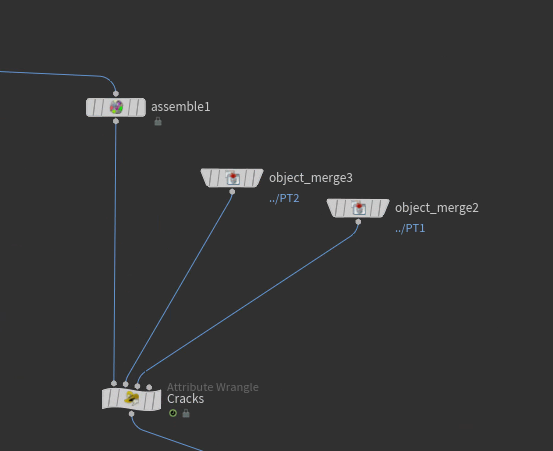
vector p1= set(@P.x, @P.y, @P.z);

vector crack1 = point(1, "P", 0);
vector crack2 = point(2, "P", 0);
vector p2 = crack1-p1;
vector p3 = crack2-p1;
float n = fit ( length ( p2 ), 0, ch("maxdist"), ch('mult'), 0 );
float n2 =  fit ( length ( p3 ), 0, ch("maxdist2"), ch('mult2'), 0 );

vector4 q0 = quaternion ( 0 );
vector4 q1 = sample_orientation_uniform ( rand ( @ptnum ) );
vector4 q2 = slerp ( q0, q1, n+n2 );
matrix3 xform = qconvert ( q2 );

setprimintrinsic ( 0, "transform", @ptnum, xform );
3. Blending spiral (end beg):
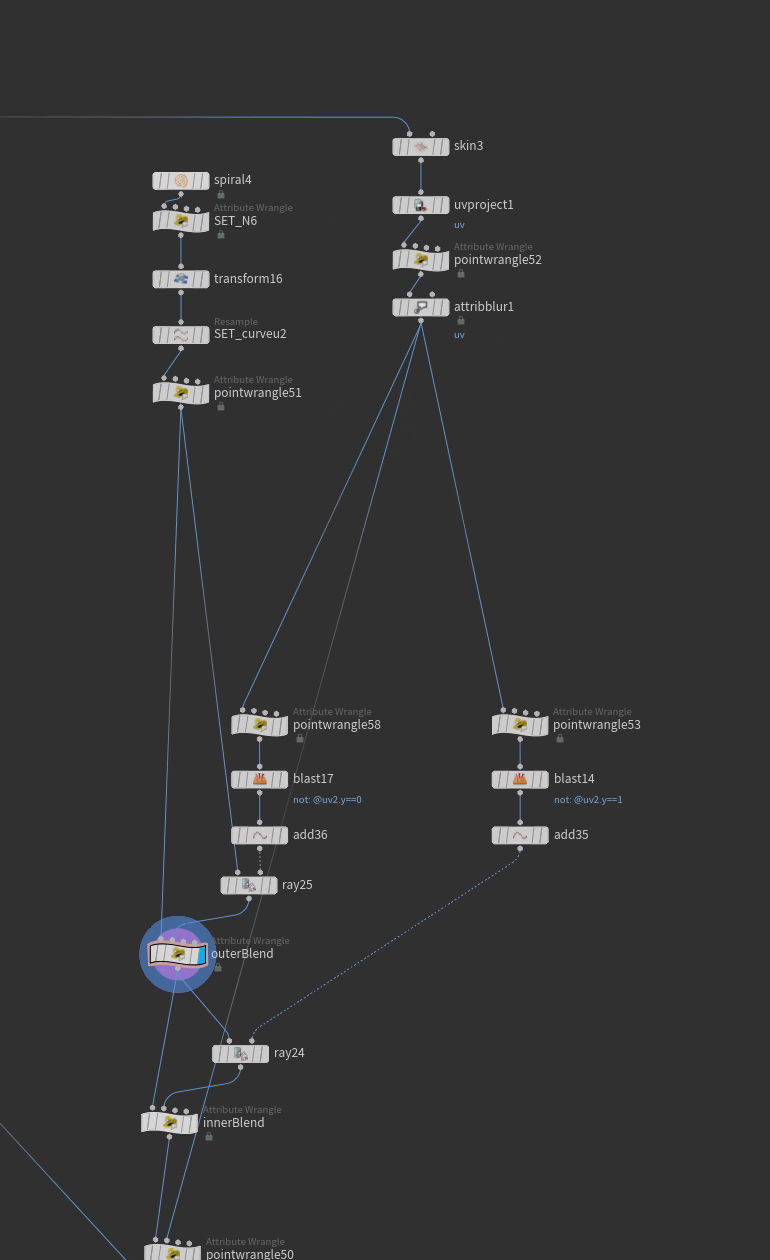
vector target = point(1, "P", @ptnum);
float blend = chramp("blendAlongSpiral", @curveu)*chf("multiplier");

@P = lerp(@P, target, blend);
4. Position copy via uv:
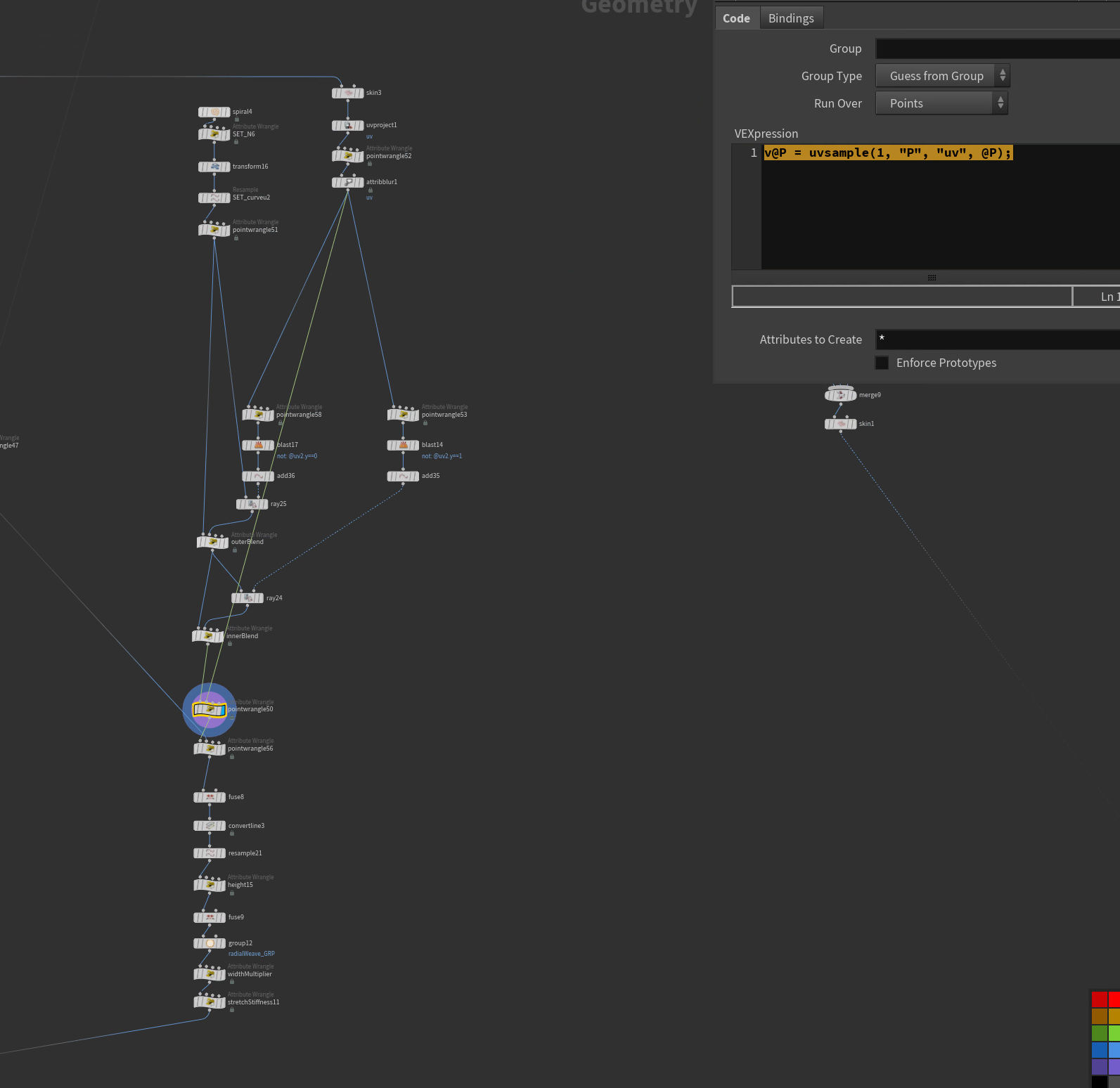
v@P = uvsample(1, "P", "uv", @P);5. move near points together:
int near = nearpoint(1, @P);
vector target = point(1, "P", near);
@P = target;
6. Affect the scale of packed prims:
//vector scale = fit01(vector(rand(@primnum)), 0,1.46) *@growth;
vector scale = ch("scale");

matrix3 trn = primintrinsic(0, "transform", @primnum);
matrix scalem = maketransform(0, 0, {0,0,0}, {0,0,0}, scale, @P);
trn *= matrix3(scalem);
setprimintrinsic(0, "transform", @primnum, trn);Orientation
Get transform and orientation from camera:
string camera = "/obj/alembicarchive1/Camera2/CameraShape2"; // path to your camera
@P = ptransform(camera, "space:current", {0,0,0});
@N = ntransform(camera, "space:current", {0,0,-1});
Random orient on points:
float seed = float(@ptnum);
vector4 orient = quaternion(radians(rand(seed) *ch("add")), normalize(rand(seed + 1)));
@orient = orient;
Point normals at camera:
string cam = chs("cam");
matrix cam_xform = optransform(cam);
vector dirtocam = cracktransform(0,0,0,{0,0,0}, cam_xform);
@N = normalize(dirtocam - @P);
Spiral
#include "math.h"
#include "voplib.h"

float easeOutCirc ( float t )
{
    return sqrt ( 1 - ( pow ( ( 1 - t ), 2 ) ) );
}

float index = @ptnum;
float numpts = @numpt;
float startAngle = radians ( ch("angle") );
float dir = 2 * ch("dir") - 1;
float steps = ( numpts - 1 ) / ch("turns");
float stepAngle = ( 2 * PI / steps ) * dir;

float inc = index / ( numpts - 1 );
int mirror = chi("spherical");
float linear = ( 1 + mirror ) * inc;
if ( mirror && index + 1 > numpts / 2 )
    linear = ( 1 + mirror ) * ( 1 - inc );

float circ = easeOutCirc ( linear );
float interp = linear + ( circ - linear ) * ch("roundness");
float r = ( ch("rx") + interp * ( ch("ry") - ch("rx") ) );

//  Apply power to radius at the end (after curvature)
inc = ( ( numpts - 1 ) - index ) / ( numpts - 1 );
float theta = 2 * PI * inc;
if ( mirror && index + 1 > numpts / 2 )
    theta = 2 * PI * ( 1 - inc );
r *= pow ( ch("falloff"), theta );

float angle = index * stepAngle + startAngle;
float x = sin ( angle ) * r;
float z = cos ( angle ) * r;
float h = index / ( numpts - 1 );
float y = vop_bias ( h, 0.5 * ch("bias") + 0.5 );
y = vop_gain ( y, 0.5 * ch("gain") + 0.5 ) * ch("height");

matrix3 xform = dihedral ( { 0, 1, 0 }, { 0, 0, -1 } ) * lookat ( 0, normalize ( chv("n") ) );
@P = ch("scale") * set ( x, y, z ) * xform + chv("t");
Links
Big resource:
https://lex.ikoon.cz/vex-snippets/
Comparing array
Find the difference between input 1's ids and input 0's:
int delete_ids[] = array();

int numPrims = nprimitives(1);
for (int i = 0; i < numPrims; i++) {
    int leaf_id = prim(1, "leafid", i);
    append(delete_ids, leaf_id);
}

int my_id = i@leafid;

if (find(delete_ids, my_id) >= 0) {
    @group_keep=1;
}
Looping
Loop moving points on curve using CurveU:
int loop_frames = chi("loop_frame");
float fps = 29.97;
float loop_time = loop_frames / fps;


float t = @Time / loop_time;
t -= floor(t);

float ping = abs(2 * t - 1);
float speed_mult = chf("speed_mult");
ping *= speed_mult;

float exponent = chf("ease_exponent");
float slow_ping = pow(ping, exponent);

float u = f@curveu + slow_ping;
u -= floor(u);

int prim = i@class;
vector pos = primuv(1, "P", prim, set(u, 0, 0));
@P = pos;
Add a resample node with curveu, also to control amount of points
Loop points in Y:
int loop_frames = chi("loop_frames");
float fps = 29.97;
float loop_time = loop_frames / fps;


float t = @Time / loop_time;
t -= floor(t);


float offset = frac(t + rand(@ptnum)); // unique phase per point


float min_y = chf("min_y");
float max_y = chf("max_y");
float range = max_y - min_y;


@P.y = min_y + offset * range;
Loop on CurveU (nonPingPong):
1st attribute wrangle set to points after the point scatter:
vector uvw;
int prim;
float dist = xyzdist(1, @P, prim, uvw);
f@curveu = uvw.x;
i@class = prim;
2nd attrib wrangle set to points one the 1st input as the points and the 2nd to the curve with curevu from resample:
int loop_frames = chi("loop_frames");
float fps = 29.97;
float loop_time = loop_frames / fps;
//get time
float t = @Time / loop_time;
t -= floor(t);

float speed = chf("speed");

// offset
float base_u = f@curveu;
float offset_u = t * speed;

float u = base_u + offset_u;
u -= floor(u); // wrap it around

int prim = i@class;
vector pos = primuv(1, "P", prim, set(u, 0, 0));
@P = pos;Transition Crowd Based On Clip Name
string clips[] = point(0, "clipnames", @ptnum);
string target_clips[] = { "sit_idle_002", "n_sit_veryidle_002", "talking05", "talking04", "talking02", "n_sit_idle_phone_01" };

foreach (string clip; clips) {
    if (find(target_clips, clip) >= 0) {
        i@trigger = 1;
        break;
    }
}Cull by Camera
string camera = chs("camera");
vector campos = toNDC(camera,@P);

if (campos.x<(0-ch("x_pad"))|| campos.x>1+ch("x_pad") || campos.y<0-ch("y_pad") || campos.y>1+ch("y_pad") || campos.z>0){@group_blast = 1; f@blast=1;}Move Wheel on Ground by Curve
First vex is the anim by curve - move along curveu:
f@pos = chf("curveu");
float u = @pos;
int prim = 0;


vector pcurve = primuv(1, "P", 0, set(u,0, 0));
@P.z = pcurve.z;
Then the rototion vex:
float pi = 3.14159;
float curve_length = prim(1, "perimeter", 0);
float position_along = point(0, "pos", 0);
float wheel_radius = 1.0;
@wheel_rot = 360 / (2*pi*wheel_radius) * (curve_length * position_along);
Expressions
Switch by Normal:
if(point("../resample3", 0, "N", 2)<0, 0, 1)Menu expressions taken from Forum:
So you could do { parma == "" parmb == "" } this would mean they both need to be true in order to work an (and) operation. Or if { parma == "" } { parmb == "" } would be an (or) operation. You can also do
==,!=,<,>,>=,<=,=~(matches pattern),!~(doesn’t match pattern) as additional operations. What is a actually quite common is to make a parameter that is invisible (or under a hidewhen under an advanced set of options) that you can use to hide and disable parameter and folder menus.
File save path stuff:
`chs("basename")``ifs(strmatch(chs("wedge"),""), "", "_" + chs("wedge"))``ifs(ch("enableversion"), "_" + chs("versionstr"),"")``chs("framestr")``chs("filetype")`My Shelf Setup XML
My shelf tools setup, in progress. Save to houdinixx.x/toolbar/daam.shelf
<?xml version="1.0" encoding="UTF-8"?>
<shelfDocument>
  <!-- This file contains definitions of shelves, toolbars, and tools.
 It should not be hand-edited when it is being used by the application.
 Note, that two definitions of the same element are not allowed in
 a single file. -->

  <toolshelf name="daam" label="daam">
    <memberTool name="SopToTops"/>
    <memberTool name="rop_to_top"/>
    <memberTool name="TOPS_rangeselect"/>
    <memberTool name="versionup"/>
    <memberTool name="nodeVersionDown"/>
    <memberTool name="sop_makeFile"/>
    <memberTool name="showfile"/>
    <memberTool name="exportToNew"/>
    <memberTool name="sopTimeClamp"/>
    <memberTool name="Flipbook"/>
    <memberTool name="ChangeMulti"/>
  </toolshelf>

  <tool name="SopToTops" label="SOPtoTOP" icon="hicon:/SVGIcons.index?COP2_subnet.svg">
    <script scriptType="python"><![CDATA[import hou
nodes = hou.selectedNodes()
topnet = hou.node("/obj/topnet1")
if not topnet:
    topnet = hou.node("/obj").createNode("topnet")
    topnet.setName("topnet1")
for x in nodes:
    name = x.name()+"_"+str(x.parent())
    fstart = x.parm("f1").eval()
    fend = x.parm("f2").eval()
    if x.type().name() == "rop_geometry":
        ver = x.parm("vp_version")
        path = x.path()
    elif x.type().name() == "rop_alembic":
        ver = x.parm("vp_version")
        path = x.path()
    elif x.type().name() == "filecache::2.0":
        path= x.path() + "/render"
        ver = x.parm("vp_version")
    else:
        ver = x.parm("version")
        path = x.path()

    topcache = topnet.createNode("ropfetch")
    try:
        if x.parm("cachesim").eval() is 1:
            topcache.parm("batchall").set(1)
            topcache.setColor(hou.Color(.5,0,0))
        else:
            topcache.parm("framesperbatch").set(15)
            topcache.setColor(hou.Color(0,.5,0))
    except:
        if x.parm("initsim").eval() is 1:
            topcache.parm("batchall").set(1)
            topcache.setColor(hou.Color(.5,0,0))
        else:
            topcache.parm("framesperbatch").set(15)
            topcache.setColor(hou.Color(0,.5,0))
    p = hou.IntParmTemplate("version", "Version", 1, min=1, max=40)
    g = topcache.parmTemplateGroup()
    g.insertAfter("pdg_servicename", p)
    topcache.setParmTemplateGroup(g)
    topcache.parm("version").set(ver)
    topcache.parm("roppath").set(path)
    topcache.setName(name)]]></script>
  </tool>

  <tool name="TOPS_rangeselect" label="TOPS RangeSelect" icon="hicon:/SVGIcons.index?BUTTONS_set_framerange.svg">
    <script scriptType="python"><![CDATA[node = hou.selectedNodes()[0]
popup = hou.ui.selectNode(title="Select Node to grab range",node_type_filter=hou.nodeTypeFilter.Sop)

popup = hou.node(popup)
start = popup.parm("f1")
end = popup.parm("f2")
start.deleteAllKeyframes();
end.deleteAllKeyframes();

if node.type().name() == "rangeextend":
    node.parm("newrangex").set(start)
    node.parm("newrangey").set(end)
if node.type().name() == "rangegenerate":
    node.parm("rangex").set(start)
    node.parm("rangey").set(end)]]></script>
  </tool>

  <tool name="versionup" label="Node Version UP" icon="hicon:/SVGIcons.index?BUTTONS_up.svg">
    <script scriptType="python"><![CDATA[import hou
nodes = hou.selectedNodes()
for x in nodes:
        try:
            ver = x.parm("vp_version").eval() +1
        except:
            ver = x.parm("version").eval() + 1
        x.parm("version").set(ver)]]></script>
  </tool>

  <tool name="rop_to_top" label="ROPtoTOP" icon="hicon:/SVGIcons.index?CHOP_reorder.svg">
    <script scriptType="python"><![CDATA[import hou
nodes = hou.selectedNodes()
topnet = hou.node("/obj/topnet1")
frb = round((hou.playbar.frameRange()[1] - hou.playbar.frameRange()[0]) / 2)

if not topnet:
    topnet = hou.node("/obj").createNode("topnet")
    topnet.setName("topnet1")
if not hou.node("/obj/topnet1/rangegenerate_start"):
    rg = topnet.createNode("rangegenerate")
    rg.setName("rangegenerate_start")
for x in nodes:
    ver = x.parm("vp_version")
    path = x.path()
    name = x.name()
    if x.parm("extra"):
        name = name + x.parm("extra").eval()
    else: pass
    topcache = topnet.createNode("ropfetch")
    topcache.setColor(hou.Color(0,0,0))
    topcache.setUserData("nodeshape", "circle")
    p = hou.IntParmTemplate("version", "Version", 1)
    g = topcache.parmTemplateGroup()
    g.append(p)
    topcache.setParmTemplateGroup(g)
    topcache.parm("version").set(ver)
    topcache.parm("roppath").set(path)
    topcache.parm("framesperbatch").set(frb)
    topcache.setName(name)]]></script>
  </tool>

  <tool name="sop_makeFile" label="SOP makeFile From ROP" icon="hicon:/SVGIcons.index?BUTTONS_upload.svg">
    <script scriptType="python"><![CDATA[import hou, re
nodes = hou.selectedNodes()
parent = nodes[0].parent()
nodeList = []
for x in nodes:
    name = x.name()+"_load"

    version = x.parm("vp_version").eval()
    path= x.parm("sopoutput").eval()
    path = str(path)
    newpath1 = re.sub("_v\d+", "_v{0}", path).format("`padzero(3,ch('version'))`")
    newpath1 = re.sub("\.\d+", ".$F4", newpath1)


    file = parent.createNode("file")
    try:
        file.setName(name)
    except:
        continue
    file.setColor(hou.Color(0,0,1))
    file.parm("file").set(newpath1)
    p = hou.IntParmTemplate("version", "Version", 1)
    g = file.parmTemplateGroup()
    g.append(p)
    file.setParmTemplateGroup(g)
    file.parm("version").set(version)
    nodeList.append(file)

parent.layoutChildren(items=nodeList)]]></script>
  </tool>

  <tool name="showfile" label="TOPS Show File in Nautilus" icon="hicon:/SVGIcons.index?BUTTONS_addassetdirectory.svg">
    <script scriptType="python"><![CDATA[import hou, re
nodes = hou.selectedNodes()

for x in nodes:
    rpath = x.parm("roppath").eval()

    try:
        tnode = rpath.rpartition("/")[0]
        dirpath = hou.node(tnode).parm("file").eval()
    except:
        tnode = rpath
        dirpath = hou.node(tnode).parm("vp_path").eval()
        print(dirpath)
    dirpath = dirpath.rpartition("/")[0]
    hou.ui.showInFileBrowser(str(dirpath))]]></script>
  </tool>

  <tool name="exportToNew" label="SOP send to new" icon="hicon:/SVGIcons.index?BUTTONS_cut.svg">
    <script scriptType="python"><![CDATA[node = hou.selectedNodes()
net = hou.node("/obj")
for x in node:
    name = x.name()
    makeout = net.createNode("geo")
    makeout.setInput(0,x)
    makeout.setName(name+"_INOUT")
    makeout.moveToGoodPosition()
    makeout.setColor(hou.Color(.5, .25, .6))
    merge = makeout.createNode("object_merge")
    merge.parm("objpath1").set(x.path())]]></script>
  </tool>

  <tool name="sopTimeClamp" label="SOP time clamp" icon="hicon:/SVGIcons.index?SOP_timeblend.svg">
    <script scriptType="python"><![CDATA[node = hou.selectedNodes()
for x in node:
    outnode = x.outputs()[0]
    name = x.name() + "_TIMESHIFT_clamp"
    start = x.parm("f1")
    end = x.parm("f2")
    net = x.parent()
    timeshift = net.createNode("timeshift")
    timeshift.parm("rangeclamp").set(3)
    timeshift.parm("frange1").deleteAllKeyframes()
    timeshift.parm("frange2").deleteAllKeyframes()
    timeshift.parm("frange1").set(start)
    timeshift.parm("frange2").set(end)
    timeshift.setName(name)
    timeshift.setInput(0, x)
    outnode.setInput(0, timeshift)
    timeshift.moveToGoodPosition()]]></script>
  </tool>

  <tool name="nodeVersionDown" label="Node Version DOWN" icon="hicon:/SVGIcons.index?BUTTONS_down.svg">
    <script scriptType="python"><![CDATA[import hou
nodes = hou.selectedNodes()
for x in nodes:
        ver = x.parm("version").eval() -1
        x.parm("version").set(ver)]]></script>
  </tool>

  <tool name="Flipbook" label="Flipbook" icon="hicon:/SVGIcons.index?BUTTONS_capture.svg">
    <script scriptType="python"><![CDATA[import hou
import re

def flipbook_from_node():
    try:
        # Ask user to pick a ROP node to steal the path from
        stealfile = hou.ui.selectNode(
            title="Select OpenGL Export Node to steal path from",
            multiple_select=False,
            node_type_filter=hou.nodeTypeFilter.Rop
        )
        if not stealfile:
            return

        # Get the output path and convert to $F4 format
        filepath = hou.node(stealfile).parm("vp_path").eval()
        renderpath = re.sub(r'\.\d+\.', '.$F4.', filepath)

        # Confirm the output path
        confirm = hou.ui.displayMessage(
            f"Use this path?\n\n{renderpath}",
            buttons=('Yes', 'No'),
            default_choice=0
        )
        if confirm != 0:
            return

        # Resolution preset options
        resolution_presets = [
            "1920x1080",  # Default
            "1280x720",
            "2048x858",
            "3840x2160",
            "Custom"
        ]

        # Ask user to select resolution preset
        choice = hou.ui.selectFromList(
            resolution_presets,
            message="Select Flipbook Resolution",
            title="Resolution Presets",
            exclusive=True,
            default_choices=[0]
        )

        if not choice:
            return

        selection = resolution_presets[choice[0]]

        if selection == "Custom":
            # Ask for custom resolution
            resx_str = hou.ui.readInput("Enter custom resolution X:", buttons=("OK",), close_choice=0)[1]
            resy_str = hou.ui.readInput("Enter custom resolution Y:", buttons=("OK",), close_choice=0)[1]
            resx = int(resx_str)
            resy = int(resy_str)
        else:
            resx, resy = map(int, selection.split("x"))

        # Get current frame range
        frames = hou.playbar.frameRange()

        # Setup the flipbook
        cur_desktop = hou.ui.curDesktop()
        scene = cur_desktop.paneTabOfType(hou.paneTabType.SceneViewer)
        if not scene:
            hou.ui.displayMessage("No Scene Viewer found.")
            return

        scene.flipbookSettings().stash()
        flipbook_options = scene.flipbookSettings()

        flipbook_options.output(renderpath)
        flipbook_options.frameRange((frames[0], frames[1]))
        flipbook_options.useResolution(True)
        flipbook_options.resolution((resx, resy))

        # Run the flipbook
        scene.flipbook(scene.curViewport(), flipbook_options)

    except Exception as e:
        hou.ui.displayMessage(f"Error: {str(e)}")

# Run it
flipbook_from_node()]]></script>
  </tool>

  <tool name="ChangeMulti" label="ChangeMultiParm" icon="hicon:/SVGIcons.index?BUTTONS_pdg_task_table.svg">
    <script scriptType="python"><![CDATA[import hou

# Prompt for parameter name
parm_name = hou.ui.readInput("Parameter to change (e.g. 'uniformscale')", buttons=("OK", "Cancel"))[1]
if not parm_name:
    raise hou.Error("Parameter name not specified.")

# Prompt for value (literal or expression)
value_input = hou.ui.readInput(f"Value to set for '{parm_name}'\n(Prefix expressions with expr:)", buttons=("OK", "Cancel"))[1]
if not value_input:
    raise hou.Error("Value not specified.")

# Get selected nodes
selected_nodes = hou.selectedNodes()
if not selected_nodes:
    raise hou.Error("No nodes selected.")

# Check for expression prefix
is_expr = value_input.strip().startswith("expr:")
expr_str = value_input.strip()[5:].strip() if is_expr else value_input.strip()

# Apply to all selected nodes
for node in selected_nodes:
    parm = node.parm(parm_name)
    if not parm:
        print(f"Node '{node.name()}' does not have a parameter named '{parm_name}'")
        continue

    try:
        if is_expr:
            parm.setExpression(expr_str, language=hou.exprLanguage.Hscript)
        else:
            # Try float conversion first
            try:
                val = float(expr_str)
            except ValueError:
                val = expr_str
            parm.set(val)
    except Exception as e:
        print(f"Failed to set value on '{node.name()}': {e}")
]]></script>
  </tool>

  <shelfSetEdit name="shelf_set_1" fileLocation="/mnt/jobs/software/houdini/hfs20.5.370-py310/houdini/toolbar/ShelfDefinitions.shelf">
    <addMemberToolshelf name="NOISE" inPosition="14"/>
    <addMemberToolshelf name="daam" inPosition="15"/>
  </shelfSetEdit>
</shelfDocument>
Pop Birth Attribute
Here’s its existing code:
#include <voptype.h>
 #include <voplib.h>

int npts = ch("npts");
 int seed = ch("seed");
 float frame = ch("frame");
 int firstpointcount = ch("firstpointcount");
 int firstprimcount = ch("firstprimcount");

for(int i = 0; i < npts; ++i)
 {
  float r = rand(vop_floattovec((float)i, frame, (float)seed));
  int sourcept = (int)(r * firstpointcount);
  sourcept = clamp(sourcept, 0, firstpointcount-1);
  int newpt = addpoint(geoself(), sourcept);
  setpointattrib(geoself(), "sourceptnum", newpt, sourcept);
 }

 for(int i = 0; i < firstprimcount; ++i)
   removeprim(geoself(), i, 0);
 for(int i = 0; i < firstpointcount; ++i)
   removepoint(geoself(), i);
It works by taking the total number of points that are supposed to be birthed this frame and spreading it randomly across the source points. But we want to go through all the source points, read the @birth attrib, and birth that many particles on the point. So replace the bold bit with this new code:
for(int sourcept = 0; sourcept < firstpointcount; ++sourcept)
{
 for (int j = 0; j < point(geoself(), "birth", sourcept); j++) {
 int newpt = addpoint(geoself(), sourcept);
 setpointattrib(geoself(), "sourceptnum", newpt, sourcept);
 }
}